
AI explains all financial news and articles — instantly.
Open any financial article. Lirefin tells you what it means for your stocks — bullish, neutral, or bearish — with the reasoning behind it. Built for investors who'd rather understand than skim.
Watch the flow: pick text → analyze → portfolio-aware summary in the side panel.
Built for how you actually read the news.
Skip the noise. Get the takeaway, the ticker impact, and the evidence — in seconds, in your language, on the page you're already reading.
Knows the news sites you read
A subtle dot in your toolbar lights up when there's something worth analyzing on Reuters, Bloomberg, CNBC, FT, WSJ, Yahoo Finance, Investing.com — 25+ sites recognized out of the box, plus smart fallback for everything else.
Built around your portfolio
Add the stocks and ETFs you actually hold — US, European (XETRA, LSE, Euronext), or Asian (TSE, HKEX, KOSPI). Every analysis is filtered through your real exposure, not generic stock summaries you'd ignore.
Clear breakdown — no jargon
Every analysis arrives as a clean structured response: per-ticker sentiment, confidence score, plain-English reasoning, and the exact quote that supports it. No hallucinated tickers. No vibes.
Reads any language you read
Articles in English, Turkish, German, French, Spanish, Italian, Portuguese, Dutch, Japanese, Chinese, Korean, Arabic, or Russian — Claude detects automatically. Output in whichever of these 13 languages you prefer.
Privacy-first by design
API keys live only on the backend — never in your browser. Article text is never persistently logged. A short 5-minute cache avoids re-charging you for the same article. No third-party trackers. No browsing history.
Side panel, popup, or floating button
Pin Lirefin in the side panel for a permanent dashboard, summon it from the toolbar, or click the floating button next to recognized articles. Hide the FAB per-site or everywhere — your call.
The full flow — on pages you already read.
From drag-select through portfolio-aware Claude output — all in the side panel beside the article (with credit transparency and History when you want it).
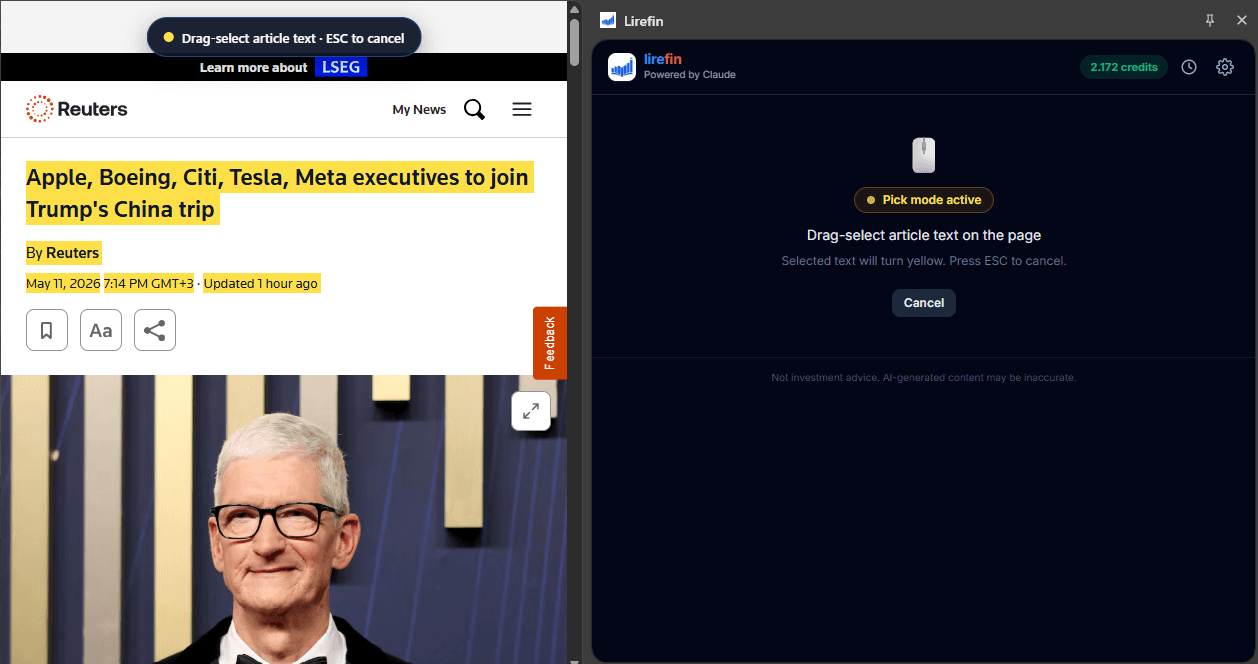
Drag-select the passage you care about
Highlight headlines, bullets, or a full passage on Reuters, Bloomberg, or any page. ESC cancels cleanly — no fiddly copy-paste.
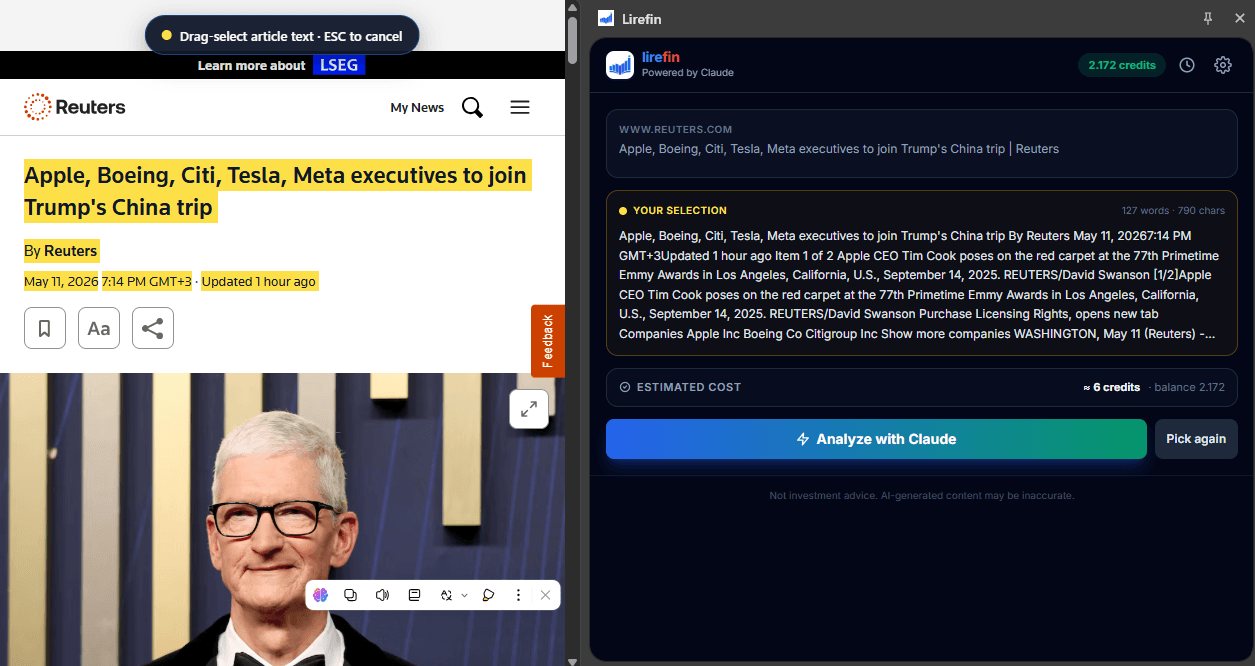
See exactly what ships to Claude — then hit "Analyze"
Transparent word count and credit estimate before you spend. Confirm your selection or pick again in one tap.
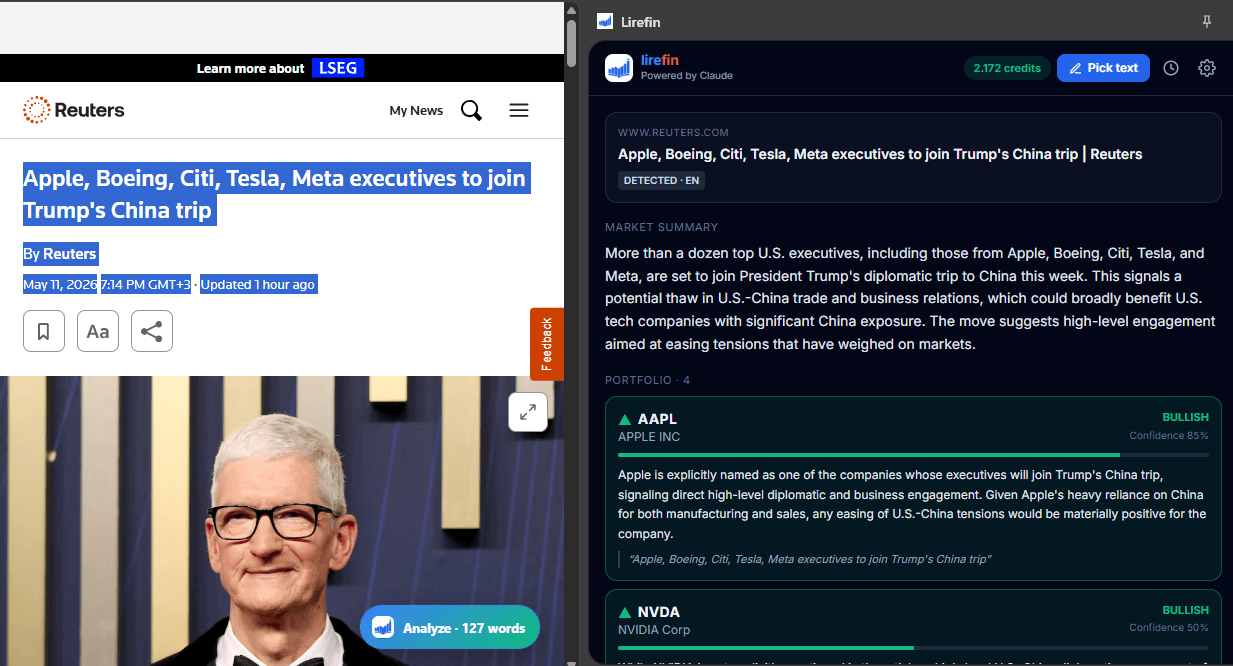
Per-ticker sentiment with evidence
BULLISH · NEUTRAL · BEARISH per holding, confidence, reasoning, and the exact sentence from the piece — beside the article you read.
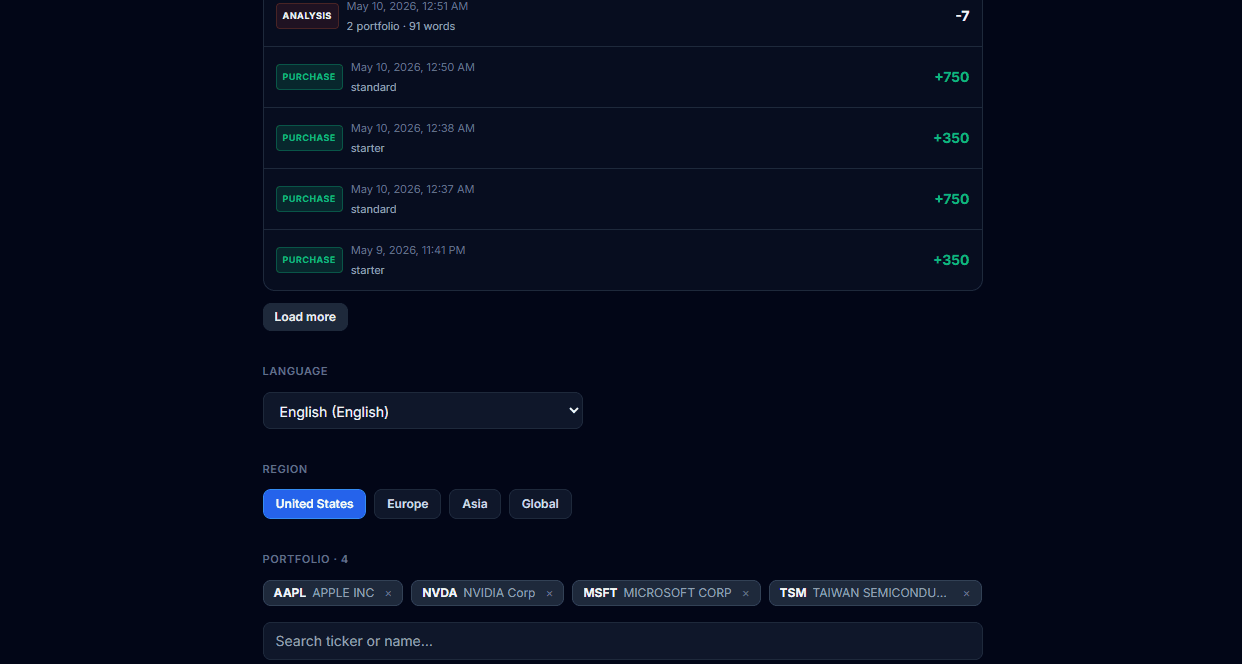
Language, region, and your holdings
Output language, geography, portfolio tickers, and billing activity — centralized in one dark, focused panel.

Revisit past runs anytime
Every analysis lands in History — word counts, portfolios covered, timestamps, and credit usage — with a discreet disclaimer footer.
Product UI shown alongside live news pages for illustration. Screens are from real workflows; ticker examples are illustrative — not an analyst recommendation or investment advice.
Three clicks from headline to thesis.
No setup forms, no dashboards to learn. Add your tickers once and keep reading the way you already do.
- 1
Open any financial article
Browse like you normally do — Reuters, Bloomberg, FT, your favourite blog. Lirefin's dot lights up when it spots a financial story.
- 2
Click Analyze
Floating button on the page or one click in the toolbar. We extract the article cleanly and send only the text — never your tabs or browsing history.
- 3
Get a portfolio-aware breakdown
Per-ticker sentiment, confidence score, plain-English reasoning, and the exact quote that supports it — opens beside the article in the side panel.
Start free. Upgrade when you read more than you write.
Paid plans are launching soon. Until then, every new account ships with 25 free credits — enough to feel out the product.
Free
Try the full extension — no credit card required.
- 25 free analysis credits on signup
- All 13 output languages
- Side panel + floating button
- Portfolio with up to 50 assets
Standard
Everyday reader — covers a few articles a day.
- 750 credits / month
- +7% bonus credits
- Priority queue
- Email support
- All Free plan features
Pro
Active investor or analyst tracking many tickers.
- 2,000 credits / month
- +14% bonus credits
- Earnings calendar reader (beta)
- Multi-portfolio support
- All Standard plan features
Lirefin is a reading & summarization assistant. Output is for informational purposes only and is not investment advice. AI analyses can be wrong — always verify before acting.
Questions, answered.
Everything we'd want to know before installing a finance extension. Still missing something? Drop us a line at hello@lirefin.com.
Is Lirefin giving me investment advice?+
No. Lirefin summarizes news articles and labels how their content reads with respect to the assets in your portfolio — bullish, neutral, or bearish — based on the text alone. Output is informational and AI-generated; it can be wrong, biased, or outdated. Treat it as a faster way to read the news, not as a recommendation.
Which sites does it work on?+
Lirefin auto-detects 25+ major financial sites including Reuters, Bloomberg, CNBC, Wall Street Journal, Financial Times, MarketWatch, Yahoo Finance, Seeking Alpha, Investing.com, Barron's, Forbes, The Motley Fool, Benzinga, and more. For sites we don't recognize explicitly, it falls back to DOM heuristics — if the page reads like a financial article, the Analyze button appears anyway.
What languages are supported?+
Lirefin reads articles in any language Claude understands and produces output in 13 of them: English, Turkish, German, French, Spanish, Italian, Portuguese, Dutch, Japanese, Chinese, Korean, Arabic, and Russian. Set your preferred output language in Settings.
Do you log my browsing history?+
No. Lirefin only sends the text of articles you explicitly press Analyze on, plus your portfolio holdings, to our backend. We do not log article text persistently. We use a short 5-minute SHA-256 cache so re-clicking Analyze on the same article doesn't burn another credit. Your tabs, browsing history, cookies, and form data are never read.
Where does the AI come from?+
All analyses are generated by Anthropic's Claude models via our backend proxy — your API key never leaves the server. We use Claude's tool-use API, which forces every response into a strict JSON schema (ticker, sentiment, confidence, reasoning, supporting quote) — that's how we keep hallucinated tickers out.
How do credits work?+
Each analysis consumes credits based on the article length and the number of assets in your portfolio. New accounts ship with 25 free credits. Paid monthly plans (launching soon) give you a credit budget that resets each cycle, plus bonus credits at higher tiers.
Can I cancel anytime?+
Yes. Once paid plans go live, you'll be able to upgrade, downgrade, or cancel directly from the extension's settings panel. Cancelled subscriptions remain active until the end of the current billing cycle.
Do you support European or Asian tickers?+
Yes. We support US stocks and ETFs, plus European exchanges (XETRA, LSE, Euronext) and Asian exchanges (TSE, HKEX, KOSPI), backed by Finnhub. The settings panel includes a debounced ticker search so you don't have to remember exchange suffixes.
Stop skimming.
Start understanding.
Install Lirefin in 30 seconds. Get 25 free credits. Cancel any time.
No credit card required · No browsing data collected